
Documentation Index
Fetch the complete documentation index at: https://docs.elitea.ai/llms.txt
Use this file to discover all available pages before exploring further.
Overview
This guide provides step-by-step instructions for migrating existing OpenAPI toolkits to ELITEA version 2.0.0 B2. This release introduces mandatory credential configuration for all OpenAPI toolkits.Breaking Changes
OpenAPI Toolkit: Required Credentials Configuration Affected Users: All users with existing OpenAPI toolkits What You Need to Do:Step 1: Update Existing OpenAPI Toolkits
- Navigate to Toolkits: Open the sidebar and select Toolkits
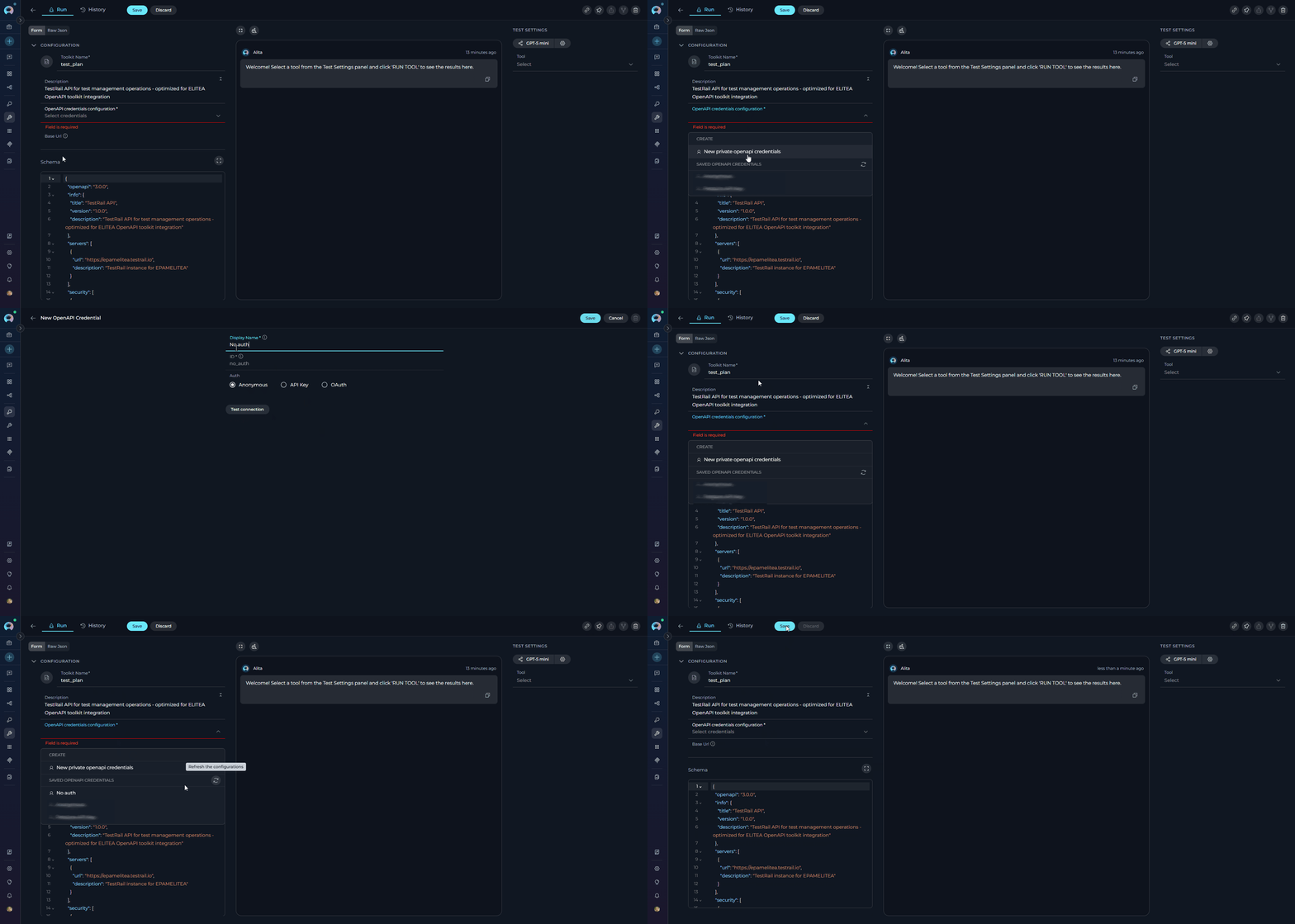
- Open Toolkit: Click on your existing OpenAPI toolkit - you will see the OpenAPI credentials configuration field highlighted
- Access Credential Dropdown: Click on the OpenAPI credentials configuration field
-
Create New Credential: Click New OpenAPI credentials from the dropdown
- You will be navigated to the credential creation page
- Select Type: OpenAPI Configuration is pre-selected
- Configure Authentication: Select the appropriate authentication method:
- For APIs with authentication: Choose either:
- API Key Authentication (Bearer, Basic, or Custom header)
- OAuth 2.0 Authentication (OAuth flows)
- For APIs with authentication: Choose either:
- For public APIs without authentication: Select Anonymous
- Fill Required Fields: Complete the authentication configuration based on your selected method
- Save Credential: Click Save to create the credential
- For detailed authentication configuration instructions, see the OpenAPI Toolkit Guide - Authentication Methods
- Navigate Back: Return to the Toolkit detail page
- Refresh Credentials: Click the refresh icon in the OpenAPI credentials configuration dropdown to load your newly created credential
- Select Credential: Choose your credential from the dropdown
- Save Toolkit: Click Save to update the toolkit
- Existing OpenAPI toolkits will not function until credentials are configured
- If your API does not require authentication, you must still create and select an Anonymous credential
- If you already have credentials created, skip step 4 and directly select your credential from the dropdown
- You can reuse the same credential across multiple toolkits that access the same API
Step 2: Verify Toolkit Functionality
After updating your toolkits, verify they are working correctly:- Open Toolkit Detail Page: Navigate to your updated toolkit
- Access TOOLS Section: View the list of available tools
- Test a Tool: Select any tool and use the TEST SETTINGS panel to execute a test request
- Check Response: Verify that authentication is working and you receive expected responses
Need Help?
If you experience issues during migration or have questions about the new credential requirements:- Review the complete OpenAPI Toolkit Integration Guide
- Check the Troubleshooting section for common issues
- Contact ELITEA Support for assistance